
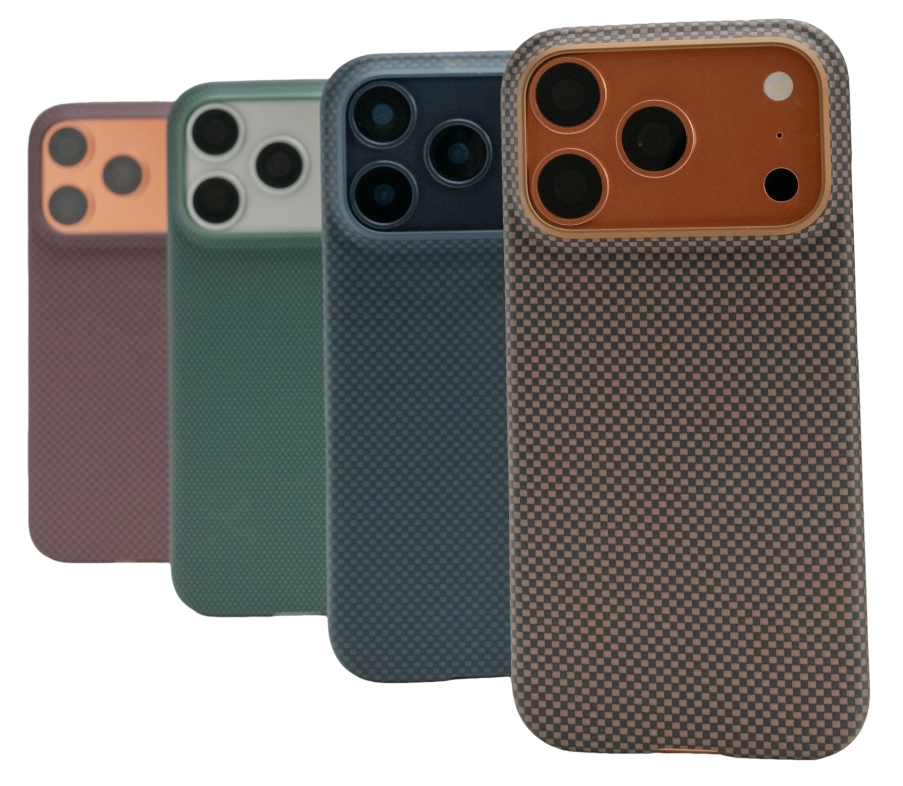
Filming with a phone puts it under a combination of loads that ordinary use never produces at the same time: sustained processing, a screen running at full brightness, a camera working continuously, and a device being held, clamped and repositioned for hours. This guide covers what that does to the phone, how to protect the camera without obstructing it, and which habits keep a shooting session from ending in a thermal shutdown.
Filming Stresses a Phone Differently
Photography is a series of short bursts — filming is a continuous load, and every part of the phone is busy at once. The screen is on and bright, the image sensor is reading continuously, the processor is encoding, and the storage is writing. Add a radio for a wireless monitor or a cloud backup and the thermal budget is gone before the first take is finished.
| What filming does | Why it matters | What actually helps |
|---|---|---|
| Continuous sensor and encoder load | Heat accumulates instead of being shed between shots | Shorter takes with pauses; nothing charging while recording |
| Screen at full brightness | A bright display is a heat source sitting on top of a hot phone | Lower the brightness and use an external monitor where possible |
| Held, clamped and repositioned | Grip failures and clamp pressure land on the case, not the phone | A case with controlled texture; a clamp that avoids the buttons |
| Lens close to surfaces | The camera surround is the first point of contact | A raised camera edge and a clean microfibre cloth |
Only the last row is really about the case. The rest is about how the session is run, and that is where most filmed sessions fail.
Heat Is the Real Limit on Long Recording
Every phone has a thermal limit — and it enforces that limit by reducing what the camera is allowed to do. The first symptom is usually a warning; the next is the camera app closing or the recording stopping, which is the most expensive failure in a shooting day because the shot is unrecoverable.
Three things make it worse. Charging while recording adds heat at the same time as the camera and screen. A wireless charger in a car adds more. And direct sun on a dark phone in a warm environment removes the phone's ability to shed heat at all.
The practical fix: shoot in shorter takes with real pauses rather than one continuous run, keep the phone off charge while recording, and keep it out of direct sun between takes. A thin case adds very little insulation, so it does not have to come off in normal conditions, but if the phone is already running warm, removing it for the remainder of the take is a sensible step.
Camera Protection Without Blocking the Shot
The camera surround is the part of a case that earns its place on a shooting phone — it is the first thing to touch any surface the phone is set down on. A raised edge keeps the lens off that surface, which matters most when the phone is being placed on gravel, a concrete ledge or a restaurant table.
What it must not do is interfere. Three checks cover it:
- The edge must be smooth and low enough not to catch the frame. A surround that protrudes into the corner of the image is worse than no surround at all.
- The flash and any sensor beside the lens must be clear. A case that partially covers them produces flare or mottled colour in low light, and it is not always obvious on the phone screen.
- The phone must still sit flat and steady. A surround that rocks the phone makes long exposures and time-lapses harder than they need to be.
The practical fix: before a shoot, take one frame with the case fitted and one with it removed at the widest setting you intend to use, and compare the corners. It takes a minute and it settles the question.
Grip, Mounts and Rigs
A phone being framed overhead, held at arm's length or passed between people has a real chance of being dropped — and grip is what prevents it. A smooth, glossy case is the wrong surface for that work; a controlled texture or a woven finish is what keeps a phone in a hand that is also holding a coffee, a script or a light stand.
Mounts introduce a different set of considerations. A clamp transfers load to a small area of the case, so it should be positioned on the body of the case rather than over the volume or power buttons, where pressure can activate a control or deform the frame. Magnetic mounts depend on the ring inside the case engaging centrally, and where a rig uses a threaded adapter, the adapter is normally fitted to the phone or to a magnetic plate rather than to the case itself.
Vibration is worth repeating here in a filming context, because rigs are often attached to moving vehicles and bikes. Sustained high-frequency vibration passes through the mount into the phone, and stabilised camera modules are the part least able to tolerate it. A damped interface is not a luxury in that setup; it is the difference between a phone that survives the shoot and one that comes home with a damaged camera.
Wind, Rain and Cold
Three conditions outside the case's control change how a shoot has to be run. Wind is mostly an audio problem, which a foam windshield on an external microphone solves better than anything you can do to the phone. Rain is a water problem, and the relevant figure is the phone's own water resistance rather than the case's, since a case does not seal the phone and can actually trap moisture against it if water gets in.
Cold is the one people underestimate. Battery capacity falls sharply in low temperatures, so a phone that reports health at home can shut down mid-take outdoors. Moving a cold phone into a warm room also creates condensation on and inside it, which is best handled by letting the phone reach room temperature in a sealed bag rather than by wiping it dry.
The practical fix: in cold conditions, keep the phone in an inside pocket between takes rather than in an outer bag, and expect to carry more battery than the shoot technically needs.
Cleaning Between Takes
A fingerprint on the lens is the most common cause of a soft-looking shot — and it is also the easiest problem in this article to solve. A dry microfibre cloth lifted from the pocket removes fingerprints, dust and salt without any liquid reaching the camera surround or the port openings.
What not to do is the same as anywhere else on a phone: no alcohol wipes on the case finish, no household cleaners, and no abrasive cloths. On a shooting day the case is handled more than the phone, so a dry wipe between takes keeps both clean.
What a Case Should Do for a Shooting Phone
- Cover the camera surround with a raised, smooth edge that stays out of frame.
- Provide grip through texture rather than through bulk or an add-on ring.
- Stay thin enough not to matter thermally while still covering the corners and frame edges.
- Include an aligned magnetic ring if the phone is used on mounts and rigs.
- Come off and go back on easily, so it can be removed for a long take on a hot day without flexing it.
That is a short specification, and it describes a case built for daily use rather than a specialised filming accessory. For most shoots, a slim case plus a clean cloth is the entire protection strategy.
Frequently Asked Questions
Should I remove my phone case when filming video?
Not routinely. A thin case adds very little insulation and it protects the camera surround when the phone is set down between takes. If the phone is already running hot and a take is about to run long, removing the case helps slightly — the bigger gains come from pausing between takes and not charging while recording.
Why does my phone stop recording after a few minutes?
Almost always a thermal limit. Recording uses the sensor, the processor, the screen and the storage at once, and the phone reduces or stops recording to protect itself. Shorter takes, lower screen brightness, shade and no charging during recording are the practical fixes.
Can a phone case damage the camera?
A case with a badly shaped surround can press on the camera area or block the flash, and a loose case can let grit reach the lens. A correctly shaped, tightly fitted case does the opposite: it keeps the lens off the surfaces the phone is put down on.
Is it safe to use a GPS or film rig on a bike?
The mount is the risk rather than the rig. Rigid mounts transmit road and engine vibration straight into the phone, and sustained high-frequency input is a recognised cause of damage to stabilised camera modules. Use a damped mount and keep the phone off the bars when you can.
How should I clean the lens and case between takes?
A dry microfibre cloth for both. It removes fingerprints, dust and salt without liquid reaching the camera surround or the ports, and it avoids the alcohol and abrasive cleaners that dull a case finish over time.
Conclusion
Shooting with a phone fails for ordinary reasons: heat that accumulates because takes are too long, a lens with a fingerprint on it, a grip that was never designed for an outstretched arm, and a mount that transfers vibration straight into the camera. None of those is solved by a thicker case.
What a case can do is small and specific — protect the camera surround, provide grip through texture, stay out of the frame and come off easily when it needs to. Handle the rest by managing the session: pause, shade, do not charge while recording, and wipe the lens before every take. To see the slim aramid fiber cases UICN builds for daily carrying, explore the Apple 18 Series range and the Everyday Carry and Device Protection articles, or contact us if you are specifying cases for a brand or distribution programme.